
Sending iMessages from PCs to be made available for iPhone users
- ByStartupStory | March 1, 2023
The latest Windows 11 update enables iPhone users to establish seamless connectivity between their smartphone and laptop, without the need for an expensive Mac. By utilizing the updated Phone Link desktop application developed by Microsoft, iPhone users can now send and receive messages, receive calls, and receive notifications directly on their PC. The Phone Link desktop application is pre-installed on Windows PCs, and was previously only available for Android users to synchronize their phones to their laptops.
At present, only those enrolled in the Windows Insider (beta channel) program can experiment with the feature. Microsoft has stated in a blog post that “We are launching this preview first to a limited percentage of Insiders this week, implying that not all Insiders will have access to the preview immediately. We will expand the availability of the preview to more Insiders gradually, based on the feedback.
In case users are already on the Insider program, they must confirm that they are utilizing the Phone Link application version 1.23012.169.0 or higher. If the user has access, the Phone Link application will showcase an “iPhone” option. Following the selection of iPhone, users need to establish a Bluetooth connection and scan a QR code. After the pairing process, a set of permissions must be granted by the users to enable notifications and contacts to appear accurately in Phone Link from the iPhone, as emphasized by Microsoft.
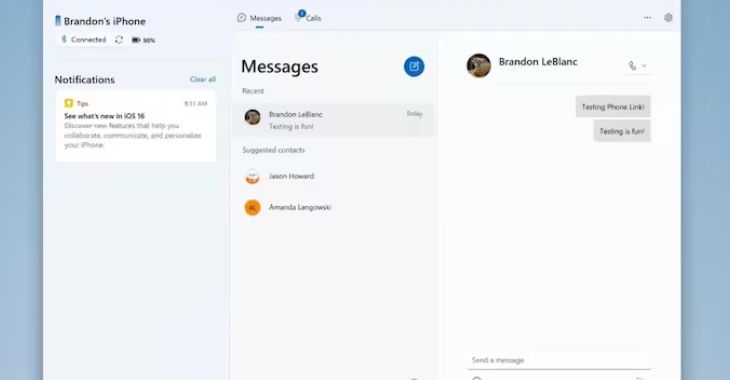
The Phone Link application provides “basic” support for iOS, including calls, messages, and contacts. It enables users to receive notifications directly via Windows notifications, but the experience may not be seamless. Microsoft has stated that Phone Link for iOS does not offer features like sending media messages or replying to group messages.
According to Microsoft, the Windows system exchanges messages via Bluetooth, and Apple transforms them into iMessage if the recipient uses an iPhone. The enhanced Phone Link application won’t provide a complete conversation history and will not indicate blue or green bubbles. It also won’t exhibit photos saved on iPhones, unlike Android phones linked to the PC.
Nevertheless, Microsoft already enables the synchronization of iCloud Photos into the native Windows Photos app. The beta version of Phone Link for iOS is available to specific testers, and Microsoft might introduce the feature with its forthcoming significant update for Windows 11, scheduled for the end of 2023.

Follow Startup Story


Related Posts